


Learn & Implement Azure ExpressRoute: A Complete Step-by-Step Guide

Introduction
As organizations accelerate their cloud adoption journey, network connectivity becomes one of the most critical aspects of a successful hybrid cloud strategy. While connecting to Azure over the public internet is suitable for many workloads, enterprise applications often require predictable performance, lower latency, enhanced security, and higher reliability.
This is where Azure ExpressRoute comes into play.
What Is Azure ExpressRoute?
Azure ExpressRoute is a Microsoft networking service that allows and enables organizations to establish a dedicated private connection between their on-premises infrastructure and Microsoft Azure, bypassing the public internet entirely. This results in improved performance, increased security, and enterprise-grade reliability for mission-critical workloads.
Prerequisites
Before starting, make sure you have an active Azure subscription, permissions to create networking resources, a planned IP address range that does not overlap with your on-premises network, and coordination with your connectivity provider. This planning is important because ExpressRoute involves both Azure-side configuration and provider-side provisioning.
1. Create an ExpressRoute Gateway
An ExpressRoute Gateway is a type of Virtual Network Gateway that allows an Azure Virtual Network to connect to an ExpressRoute Circuit. Before creating the gateway, you need a Virtual Network and a dedicated subnet named GatewaySubnet. This subnet is reserved for Azure gateway resources and should be sized carefully to support future scalability.
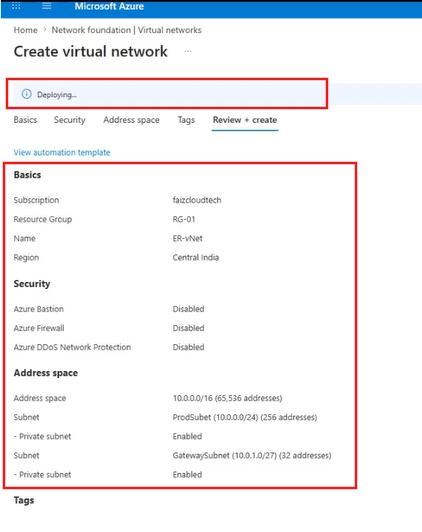
To create the required network foundation, go to the Azure portal and create a Virtual Network. For example, you can use a resource group such as RG-01, a virtual network name such as ER-VNet, a region such as Central India, and an address space such as 10.0.0.0/16. Always verify that the selected address range does not overlap with your existing on-premises network to avoid routing conflicts.
Next, create a dedicated GatewaySubnet. A commonly recommended approach is to use a subnet size such as /27 or larger, because it provides flexibility for future gateway changes or upgrades. After the Virtual Network and GatewaySubnet are ready, search for Virtual Network Gateway in the Azure portal and create a new gateway with the gateway type set to ExpressRoute.
During gateway creation, select the correct Virtual Network, choose the same region where the VNet exists, and select an appropriate gateway SKU based on workload requirements. One common beginner mistake is selecting VPN instead of ExpressRoute. Make sure the gateway type is ExpressRoute, because VPN Gateway and ExpressRoute Gateway serve different connectivity models.



2. Create and Provision an ExpressRoute Circuit
The ExpressRoute Circuit is the core resource that represents your private connection between your organization and Microsoft. To create one, open the Azure portal, search for ExpressRoute Circuits, and choose Create. Provide the required details such as subscription, resource group, circuit name, region, provider, peering location, bandwidth, SKU, and billing model.
The peering location is especially important because it represents the physical location where your network peers with Microsoft. This is not necessarily the same as the Azure region where the resource is created. Choose the provider, peering location, and bandwidth based on your enterprise connectivity requirements and the availability of your service provider.
After the circuit is created, Azure will generate the circuit and display its status. At this stage, the provider status may show as Not Provisioned. This means the circuit exists in Azure, but your connectivity provider has not yet completed their side of the configuration. Once the provider completes provisioning, the provider status changes to Provisioned and the circuit can be used as part of the ExpressRoute connectivity workflow.
For production environments, also consider resiliency requirements. Microsoft provides different resiliency options for ExpressRoute circuits, and critical workloads should be designed with high availability and failure scenarios in mind. The right resiliency model depends on the importance of the workload, business continuity requirements, and network architecture.


3. Retrieve the Service Key for Provider Connectivity
After creating the ExpressRoute Circuit, the next step is to retrieve the Service Key. The Service Key is a unique identifier generated by Azure for your ExpressRoute Circuit. You provide this key to your connectivity provider so they can identify your circuit and complete the provider-side provisioning process.
Think of the Service Key as a reference number that links the Azure-side circuit with the provider-side configuration. It should be shared only with the authorized connectivity provider and should never be posted publicly or shared in screenshots, public documents, or unsecured channels.
It is also important to understand the billing impact. ExpressRoute billing starts from the moment the Service Key is issued, so the circuit should be created when the provider is ready to continue provisioning. This helps avoid unnecessary charges while waiting for provider-side readiness.

Best Practices for ExpressRoute Implementation
Plan your IP address space carefully and avoid overlap with on-premises networks.
Use a properly sized GatewaySubnet, such as /27 or larger, to support future changes.
Select ExpressRoute as the gateway type instead of VPN when creating the gateway.
Choose the provider, peering location, SKU, bandwidth, and billing model based on business requirements.
Protect the Service Key and share it only with the authorized connectivity provider.
Create the circuit only when the provider is ready, because billing begins when the Service Key is issued.
Conclusion
Azure ExpressRoute is one of the most powerful networking services available in Microsoft Azure. By providing dedicated, high-performance, and secure connectivity between on-premises environments and Azure, it enables organizations to build resilient hybrid cloud solutions with confidence.
Happy Learning and Happy Clouding! 🚀☁️


Comments